

Once you have chosen your Delaware Statutory Trusts (DSTs), one question is left: does the replacement actually match what you sold?
The NexTrend Securities 1031 DST Replacement Calculator checks all three numbers a 1031 exchange has to match (equity, debt and total real estate value) and shows what is still outstanding on each. It is possible to meet one and miss another.
This tutorial walks through one example, step by step. In the pictures, an orange outline shows where to type or click.
What you need
- Your sale: the equity that went to your qualified intermediary and the debt that was paid off.
- Your DSTs: each one’s LTV (loan-to-value) and forecast return from its offering documents.
Why all three numbers matter
For full tax deferral, you must reinvest all net equity, replace the debt that was paid off, and buy at least as much total value as you sold. These are the reinvestment requirements; other exchange rules and deadlines also apply.
The three do not substitute for each other in both directions. Additional cash can cover debt you did not replace. Extra debt cannot cover equity you did not reinvest.
Step 1: Enter your sale
In the top row, enter the Equity and the Debt. In this example, the sale has $600,000 of equity and $650,000 of debt. RE Value, the value of the property you sold, fills in by itself: $1,250,000.

Investor name is optional and prints on the worksheet. Type only in the yellow boxes. Every white and gray figure is calculated for you. Point at any heading with a dotted underline for a short explanation.
Step 2: Add your DSTs
Use one line per DST. Enter its Forecast return %, its Property name and its LTV. This example uses three hypothetical DSTs at 48%, 50% and 54% LTV. Leave Equity empty for now.

There are five lines to start; + DST adds up to two more.
Step 3: Split your equity
Click Split $ evenly. Each DST gets an equal share of the equity, $200,000 here, and the calculator works out each DST’s debt, real estate value and forecast income.

Adjust from there:
- Lock an amount: type it, then click its $. Split $ evenly never changes a locked amount.
- Add or subtract in a box. Type +500 at the end of one DST’s equity and −500 at the end of another’s to move money between them. You can also type 150k for 150,000 or 1.2m for 1,200,000.
Step 4: Read the results
The Remaining to Replace row shows what still has to happen for Equity, Debt and RE Value:
- $0.00 means that test is met.
- A figure marked under is the amount still to be replaced.
- A figure marked over is more than was sold, which meets that test. Extra debt raises your leverage, so the calculator points it out.
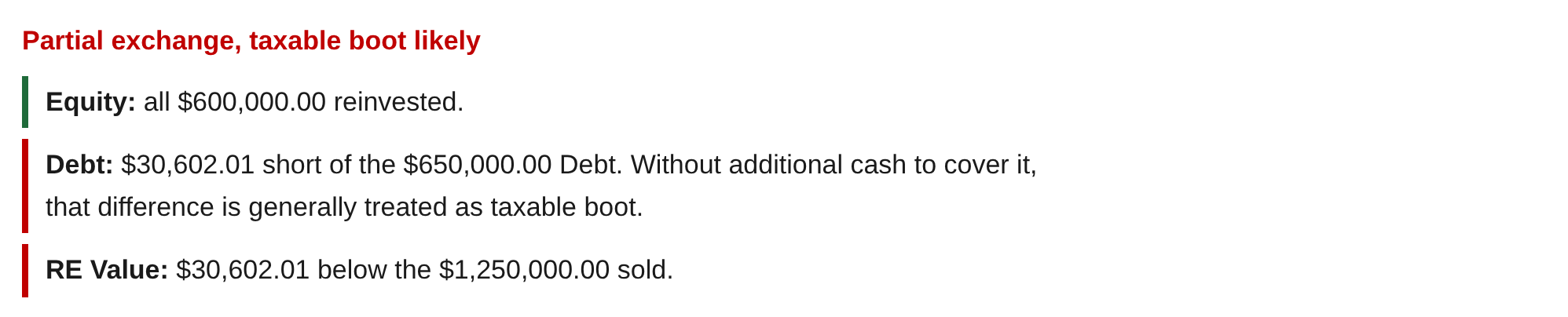
In the example, the equity is fully reinvested, but the debt and the value are each $30,602.01 under.
Under the buttons, the summary reads Fully replaced in green when all three tests are met, or Partial exchange, taxable boot likely in red when any one is not, with a line for each test explaining where it stands:
Step 5: Match the debt with the box under the buttons
When the debt does not match, the box under the buttons shows what would. In the example: “A DST at 55.28% LTV puts about $150,000 in each of the 4 DSTs.”
If you are considering another DST, type its LTV in the box. In the example, a fourth DST at 55% LTV is entered. The box works out new amounts for all four DSTs that match the debt:

Nothing changes until you press Apply. The amounts go into the table and the new DST takes the next line; enter its name and forecast there. All three tests now read $0.00:

The summary changes to Fully replaced:

If the debt is over, the box shows the amounts that would match with a Cash DST (0% LTV) added, or with more in a 0% LTV line you already have.
Undo takes back Apply. The box is shown for comparison only, not as a recommendation. Click Hide to close it.
Step 6: See the forecast income
Each line shows its Annual and Monthly forecast income: the equity times the sponsor’s forecast cash-on-cash return.
The gray box under the Forecast column is your blended yield, a weighted average: total forecast income divided by the equity you placed, so each DST counts in proportion to the money in it. If some of your equity is not placed, a second box shows the yield on the full amount you needed to place.
In the example, the even split forecasts $25,500 a year ($2,125 a month), a blended yield of 4.25%. After Apply, with DST D at 4.75%, the four DSTs forecast $26,297.22 a year ($2,191.44 a month), a blended yield of 4.38%.
Forecasts are the sponsor’s estimates and may change.
Undo, reset and print
- Undo and Redo step through every change, including an LTV you try in the box under the buttons.
- Remove a line: point at its DST name and click ×. Click ↺ to bring it back.
- Reset, above the table at the right, clears the whole worksheet, including Equity and Debt. Press Undo to bring it back.
- Your worksheet is saved in this browser, with its Undo and Redo history, so it is still there when you come back.
- Print prints the worksheet.
Starting from the Finder
In the 1031 DST Replacement Finder, click ↗ on any combination. This calculator opens in a new tab with the sale, the DSTs and their amounts already filled in.
Before choosing an investment
The calculator checks the figures you enter. It does not select investments for you or determine whether a DST is suitable.
Review each offering’s risks, fees, financing, investment minimums and availability. Confirm exchange requirements with your qualified intermediary and tax advisor.
If you would like help reviewing DSTs for your exchange, contact us or call (972) 661-1283.
Try the 1031 DST Replacement Calculator →
This article is provided for general educational purposes only and does not constitute tax or investment advice. The scenario presented above is entirely hypothetical and is provided for illustrative purposes only. It does not represent the actual experience, performance, or portfolio of any specific investor or client of NexTrend Securities. DST investments involve risk, including illiquidity and potential loss of principal, and are suitable only for accredited investors. Tax treatment depends on individual circumstances. Consult your tax advisor regarding your individual situation. NexTrend Securities is not a tax advisor and does not provide tax advice.
Check that your DSTs replace your 1031 exchange.